Proton Mail is a privacy-first email service built with end-to-end encryption, zero-access security, and Swiss data protection. Designed for users who want control, anonymity, and freedom from tracking, it delivers a clean, secure, and modern email experience across all platforms.
Proton Mail is the kind of email service you choose when privacy isn’t just a preference—it’s a priority. Built by a team of scientists who met at CERN, Proton Mail was created for one mission: to give everyday people the power to communicate without being tracked, monitored, or mined for data.
In a world where Gmail and Outlook dominate the email universe, Proton Mail stands out by refusing to treat your inbox like a business asset. No ads. No snooping. No sneaky data profiling. Just pure, protected communication wrapped in modern design and powerful encryption.
If you want an email service that puts your privacy above profit, Proton Mail delivers exactly that—simply, securely, and without asking you to become a cybersecurity expert.
Key Highlights Of Proton Mail
Proton Mail isn’t shy about what it stands for—on its official platform, it proudly markets itself as the world’s most trusted privacy-focused email service. The company claims to offer full protection for your conversations through end-to-end encryption, zero-access architecture, and Swiss-grade data laws. Everything is engineered to ensure that your email belongs to you, not advertisers, not governments, and not even Proton itself.
What makes this even more appealing is that Proton wraps all this heavy-duty technology inside a clean, beginner-friendly interface. Whether you’re a coder or a casual user, you get strong security with minimal effort. And once you step into the Proton ecosystem—Mail, VPN, Drive, Calendar, Pass—you enter a fully encrypted digital life built on open-source, transparent standards.
Proton Mail’s Strongest Points
End-to-end encrypted communication
Zero-access mailbox (not even Proton can read your emails)
Switzerland-based privacy protection
Open-source, independently audited cryptography
Built-in security designed for non-technical users
Who Uses Proton Mail? (User Demographics & Real Use Cases)
Proton Mail draws in a surprisingly diverse crowd—because privacy means something different to everyone. Instead of giving generic descriptions, here’s a user-centric, real-life breakdown of who actually uses Proton Mail and why.
Privacy-First Individuals
If you're someone who hates being tracked online—or you’re simply done with big tech reading your inbox—Proton Mail gives you a peaceful, ad-free digital space. No algorithms judging your shopping habits, no marketing emails stalking you. Just clean, private communication.
Journalists, Activists, and Lawyers
If your work involves sensitive sources, confidential documents, or high-stakes communication, Proton Mail becomes more than an email—it becomes a shield.
Journalists use it to protect whistleblowers.
Activists use it to avoid surveillance.
Lawyers use it to secure client data.
No guesswork. No leaks. No “accidental data sharing.”
Businesses Safeguarding Sensitive Client Data
Whether you're handling medical reports, financial records, or company secrets, Proton Mail helps small teams act like they have a full cybersecurity department. Secure custom domains + Proton Bridge = business-level protection without enterprise-level complexity.
High-Risk Users Who Need Anonymity
If you live in a restrictive region or you simply want emails that do not reveal your identity, Proton Mail is the go-to choice. With features like encrypted IP protection, zero-access storage, and anonymous account creation, users stay in control of their digital footprint.
Regular Users Escaping Big-Tech Tracking
Maybe you’re tired of opening Gmail only to see ads for something you just searched on Amazon.
Maybe you're simply done with your inbox being “monetized.”
Proton Mail is refreshingly quiet—no ads, no scanning, no creepy personalization.
People Migrating From Gmail/Outlook for Security Reasons
Some users come to Proton Mail after experiencing security scares—such as compromised accounts, phishing attacks, and leaked passwords. Proton Mail’s built-in protection, advanced spam filters, and encrypted features turn it into a safe haven where people finally feel in control again.
Why Proton Mail Is Popular
Proton Mail didn’t become the world’s favorite privacy-focused inbox by accident—it earned it. The moment you switch from a traditional email provider, you instantly feel the difference. No ads. No trackers. No sense that your inbox is quietly being used against you. Instead, you get a clean, modern experience built around a simple promise: your email belongs to you, and only you. That clarity is refreshing, and it’s the reason so many users—from everyday people to high-risk professionals—trust Proton Mail as their daily communication hub.
Simple, modern interface with hidden advanced security
You’re greeted with a beautifully clean inbox that feels as easy as Gmail but far more private. All the complex encryption runs quietly in the background—you never have to touch cryptography or settings unless you want to. It’s everything you need, without ever feeling overwhelming.
Strong trust factor because of Swiss jurisdiction
Proton Mail operates under some of the strongest privacy laws on the planet. Switzerland’s regulations limit government overreach and protect user data from foreign surveillance. This gives users worldwide a rare sense of confidence—your inbox isn’t just encrypted, it’s legally shielded.
No ads, no data mining, no tracking
Proton doesn’t build a profile on you, doesn’t scan your messages, and doesn’t sell your behavior to advertisers. For many users, this silent commitment is the biggest relief. Your inbox becomes a true inbox—not an ad machine pretending to be one.
Protection at metadata, inbox, and ecosystem level
Your content is encrypted, your inbox is secured, and even your file storage (Drive), browsing (VPN), and passwords (Pass) can be folded into a single privacy-first ecosystem. You’re protected before the email is sent, while it’s sent, and long after it arrives.
Consistent updates and transparent development
Proton is fully open about how it works. From audits to open-source code and constant improvements, the platform evolves quickly and openly. Users feel valued because Proton listens—bugs disappear fast, features arrive often, and everything is explained clearly.
How Proton Mail Feels on Each OS
We tested Proton Mail across all platforms, and despite each OS having its own style, one thing stayed consistent: Proton Mail feels smooth, secure, and thoughtfully designed everywhere. No install steps here, as you get it on our platform page—just real impressions of how it feels to use it daily.
Android Experience
On Android, Proton Mail feels natural and mobile-first. The gesture-based inbox makes navigation fluid, and messages load fast even on mid-range devices. Notifications are reliable, and privacy options like “hide IP” or “lock app” are easy to access. It’s the perfect blend of speed, security, and mobile convenience.
iOS Experience
iOS users will immediately notice the polished animations and smooth scrolling. The app feels native—clean, minimal, and fast. Apple’s security model fits well with Proton’s approach, and despite iOS restrictions, Proton manages to deliver strong encryption without compromising usability. It feels premium, consistent, and well-optimized.
Windows Experience (via Proton Mail Bridge)
On Windows, Proton Mail feels like a professional tool. Bridge handles local encryption quietly in the background, allowing you to use Outlook, Thunderbird, or other email clients without sacrificing security. This workflow feels especially good for office setups, multitaskers, and anyone who loves desktop email productivity.
macOS Experience
Mac users get a silky smooth experience with stable syncing and quick message rendering. Whether you're using Apple Mail through Bridge or the Web app, everything feels polished and integrated into Apple’s privacy-first vibe. It runs quietly, reliably, and fits the minimalist design macOS users love.
Linux Experience
On Linux, Proton Mail feels like a natural partner. The Web interface performs exceptionally well, and the open-source philosophy aligns perfectly with the Linux community. It’s stable, resource-friendly, and powerful—ideal for developers, privacy enthusiasts, and power users who want control without friction.
Web Experience
This is where Proton Mail shines the brightest. The Web version is the most complete, feature-rich, and beautifully polished interface. It loads fast, supports browser-level encryption, and behaves like a progressive web app (PWA). If you want the full Proton Mail experience, the Web version is where everything comes together seamlessly.
Features That Feel Powerful
Proton Mail is packed with features that feel powerful without ever overwhelming you. When you use it daily, you start noticing the little ways it protects your privacy without interrupting your workflow. These are the features that make people fall in love with Proton Mail—and why so many stick with it long-term.
End-to-end encryption across messages
Every email you send and receive stays locked in a way that only you and the recipient can open. You don’t feel the encryption working—it just happens automatically in the background. It’s quiet, reliable protection you forget is even there.
Password-protected external emails
Even if the person you’re writing to doesn’t use Proton Mail, you can still send them secure messages with a simple password. It feels empowering because you stay in control of your privacy—even outside the Proton ecosystem. Perfect for sharing sensitive documents safely.
Alias and “Hide My Email” protection
Aliases give you multiple identities inside a single inbox, making online shopping, signups, and newsletters safer. It feels incredibly freeing to hand out “burner emails” without exposing your real address. Chaos stays outside—your inbox stays clean.
Encrypted contacts
Every detail of your contacts—their names, emails, even phone numbers—remains encrypted. It doesn’t change how you use your contacts, but it changes how protected they are. You feel responsible and secure at the same time.
Advanced spam & phishing filters
The filters are surprisingly smart. Spam disappears quietly, and suspicious emails get flagged instantly. It feels like having a personal security guard who watches your inbox 24/7 and never complains.
Self-destructing messages
Some emails just shouldn’t stay forever. With Proton’s expiring messages, you choose when they vanish. It feels cinematic—like you’re sending a top-secret message that deletes itself when the mission is complete.
Proton ecosystem: VPN, Drive, Calendar, Pass
Once you start using Proton’s ecosystem, everything clicks. Your files, browsing, passwords, and schedule become part of a fully encrypted world. It feels like unlocking privacy superpowers you didn’t know you needed.
Multi-device sync
Switch from phone to laptop to tablet and everything updates instantly. Messages stay consistent, secure, and synced—even across different OS platforms. It feels smooth, modern, and completely hassle-free.
Open-source cryptography
Every line of security code is open for experts to inspect. This kind of transparency builds trust instantly—you know Proton isn’t hiding anything. It feels good to use a service that invites scrutiny instead of avoiding it.
Features That Need Improvement
Proton Mail is excellent, but it’s not perfect—and that’s okay. These are the areas where we felt things could be better. Not deal-breakers, but definitely noticeable when using Proton Mail every day.
Occasional deliverability issues with certain services
Sometimes emails to specific platforms or corporate systems take a little longer or get flagged. It doesn’t happen often, but when it does, it feels frustrating—especially if you rely on Proton Mail for professional communication.
Some sites block Proton Mail signups for anti-fraud reasons
A handful of websites simply refuse Proton Mail addresses. Not because Proton is unsafe, but because its privacy-first design makes fraud detection harder for them. From a user perspective, hitting a “Proton Mail not allowed” message feels disappointing.
Encrypted search limitations
While the inbox is fully encrypted, searching across large histories can feel slower or less accurate than Gmail. It’s a trade-off between privacy and speed, but you do feel the difference when looking for older messages.
Attachments can be slower due to cryptography
Encryption adds a protective layer—but also a second or two of processing when uploading or downloading large files. It’s not slow enough to ruin your day, but you definitely notice it when sending big attachments.
Offline support still limited
You can't fully access everything offline the way you can with traditional email apps. You feel the limitations most when traveling, working remotely, or when your connection drops unexpectedly.
No full IMAP/SMTP without Bridge
If you prefer desktop clients like Outlook or Thunderbird, you must use Proton Mail Bridge. It works well, but it’s an extra step that other providers don’t require. You feel a slight dependency that’s not ideal for everyone.
Learning curve for advanced security tools
Basic use is easy, but features like PGP, encryption keys, or advanced settings require a bit of reading. It’s not overwhelming, but you feel the learning curve if you want to unlock Proton Mail’s full power.
Performance & Reliability
Proton Mail is known for security, but its performance holds up surprisingly well in day-to-day use. You feel the privacy layer, but it rarely gets in the way of normal emailing—even when moving across devices or handling big attachments.
Speed of sending/receiving
Messages between Proton users feel almost instant, and regular external emails also arrive fast—usually as quickly as Gmail or Outlook. The only slowdown you may notice happens when encryption kicks in on very large messages. It’s subtle but occasionally noticeable.
Cross-device syncing reliability
Syncing feels smooth and modern. Whether you read an email on your phone, move it into a folder on desktop, or delete it from web—everything stays perfectly aligned. You never feel out of sync, even across different operating systems.
Encryption overhead
Encryption runs silently in the background, but when you're sending or receiving attachments, you may feel an extra second or two of processing. It’s a trade-off that feels acceptable because you know exactly why it’s happening: your privacy is being protected.
Handling attachments & large messages
Small and medium-sized attachments fly through without issues. Large files (multiple MBs) can take slightly longer because of encryption operations, but the experience remains stable and consistent. Nothing breaks—just a tiny pause you grow used to.
Mobile performance vs desktop experience
On mobile, Proton Mail feels lighter and more “app-like,” while the web version feels fuller and more professional. Both are fast, but the desktop experience simply has more screen room to breathe. On mobile, animations can occasionally feel a bit heavy—but it never disrupts workflow.
Privacy & Security Breakdown
This is where Proton Mail truly stands apart. Its privacy protection isn’t a marketing pitch—it’s a deeply engineered philosophy. These features work quietly, and you only notice them when you realize how much control you actually have over your data.
How zero-access encryption works
Proton encrypts your mailbox with keys that only you control. Even Proton’s staff can't decrypt your messages—not even under legal pressure. It’s a security model that gives you ownership instead of trust.
Local encryption vs server-side encryption
Everything gets encrypted on your device first, before being sent to Proton’s servers. That means your messages and contacts reach the cloud already scrambled. The servers store encrypted blobs—not readable content—removing a major point of weakness.
External audits & cryptographic transparency
Proton regularly undergoes independent audits, and its cryptographic methods are fully documented and open-source. The more people inspect the code, the more trust you gain. It feels reassuring to use a service that wears transparency as a badge of honor.
Metadata protection
While no email provider can fully hide all metadata, Proton goes further than most by minimizing what gets logged. Your IP is stripped, your identity stays hidden, and routing information is reduced to the essentials needed for delivery.
Proton’s long-term commitment to privacy literacy
Proton invests heavily in educating users about digital privacy. Blog posts, guides, and campaigns aim to make encryption feel normal—not scary. It feels like a company genuinely trying to shift the internet toward a healthier privacy culture.
Plans & Pricing (Which User Should Pick What)
Proton Mail’s pricing can look complex at first, but each tier has a very clear audience. Whether you’re casual, privacy-focused, or running an entire organization, Proton has a plan that fits your needs without overselling.
Free Plan — Best for casual users & beginners
The free plan gives you encrypted email, basic storage, and a clean, private inbox. If you simply want secure communication without paying or switching ecosystems, this is perfect. It’s generous enough to feel useful, but limited enough not to overwhelm.
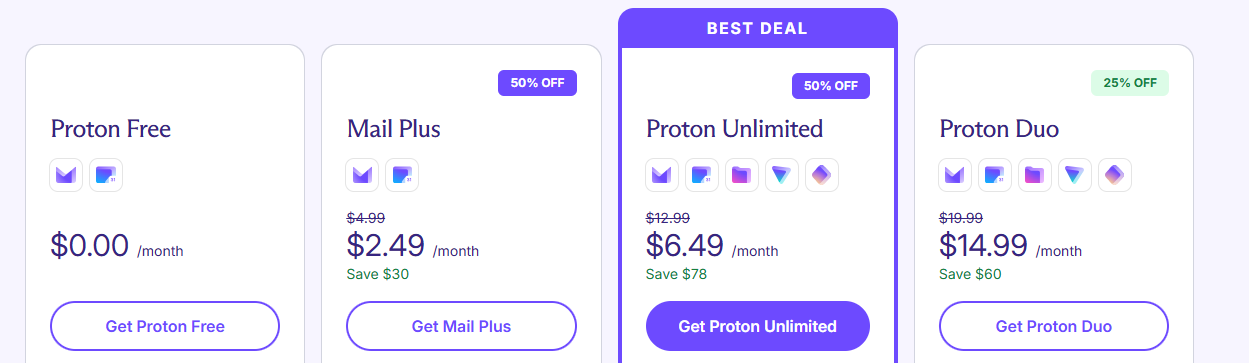
Mail Plus($2.49/Month) — Best for students, freelancers, and privacy-minded professionals
Mail Plus unlocks custom domains, more storage, priority filters, and features like unlimited messages. It’s ideal if you want serious privacy without paying for the full Proton suite. Think of it as “Proton Mail without compromises.”
Proton Unlimited ($6.49/Month))— Best for users who live inside the Proton ecosystem
This bundle gives you Mail, VPN, Drive, Calendar, and Pass with plenty of storage. If you want to replace Google completely—or simply want the smoothest all-in-one encrypted experience—this plan delivers maximum value.
Family Plans — Best for households wanting privacy across all devices
A single subscription covers multiple users, giving each person their own encrypted services. It’s great for families who want to protect kids’ or partners’ digital privacy without juggling multiple subscriptions.
Business & Enterprise Tiers — Best for organizations with compliance or confidentiality needs
Businesses get custom domains, admin controls, advanced authentication, and priority security features. If your work involves sensitive data, legal responsibility, or regulated industries, Proton’s business plans feel like a reliable shield.
What the Community Says
We researched the discussion in the Reddit thread “Honest Opinion for ProtonMail” to understand what real users actually experience — the good, the bad, and the honest. Many users praise Proton Mail for being reliable and secure, especially if email is the main thing you need. One commenter summed it up simply: “Most people that use Proton Mail are happy with it… if what you need is mail only, you can go for it.” At the same time, another long-time user highlighted why they continue trusting the service despite occasional criticisms: “I’ve used Proton for my business for several years and have zero complaints… no product is perfect, but for what they’re providing, it’s pretty awesome!”
Together, these real voices show a clear picture: Proton Mail is widely respected for its core email service, with users appreciating its privacy-first mission while still wanting the broader ecosystem to keep improving.
Proton Mail Vs Alternatives
Proton Mail vs Tutanota
Proton Mail feels like the privacy service made for people who want strong encryption without feeling like they’re in a hacker movie. It gives you a clean UI, smooth apps, and tools that just work out of the box — even if you’ve never touched a security setting in your life. Everything is modern, polished, and “Google-like,” but without the tracking headaches.
Tutanota, on the other hand, is the choice for users who want the deepest privacy layer possible and don’t mind a little strictness. It encrypts more data by default, hides more metadata, and feels like a bunker built by engineers who don’t compromise. The trade-off? It’s a little more rigid and not as compatible with everything.
Who’s Better?
Choose Proton Mail for the perfect balance of easy + private.
Choose Tutanota if you want “maximum privacy even if it’s inconvenient.”
Proton Mail vs StartMail
Proton Mail is built for people who want a smooth, app-driven, modern email experience that’s secure by design. It feels like a privacy upgrade without losing the comforts of a standard inbox. And if you're planning to use the whole Proton ecosystem (VPN, Drive, Pass), the experience feels cohesive and future-proof.
StartMail is the better match for old-school email lovers who want privacy without changing their habits. It works beautifully with classic email clients, gives you unlimited aliases, and feels extremely straightforward. No ecosystem, no apps — just private email that stays out of your way.
Who’s Better?
Choose Proton Mail if you want polished apps and an all-in-one privacy suite.
Choose StartMail if you want simplicity + unlimited aliases + traditional email workflows.
Proton Mail vs Posteo
Proton Mail gives you a high-end privacy inbox with thoughtful design, modern apps, and security innovations that feel accessible to everyone. It’s built for users who want privacy and a premium-feeling experience on every OS, not just a web page.
Posteo is the ultimate minimalist’s email: eco-friendly, super private, no phone numbers, no nonsense. It doesn’t try to be flashy or modern. It’s built for people who want stability, anonymity, and a bit of digital “peace and quiet” — without caring about extra apps or fancy interfaces.
Who’s Better?
Choose Proton Mail if you want a modern design, ecosystem tools, and convenience.
Choose Posteo if you want a simple, ethical, low-cost, privacy-first email — nothing more.
Proton Mail vs Mailfence
Proton Mail is made for everyday users, creators, teams, and privacy-first individuals who want encryption handled invisibly in the background. It’s ideal when you want secure email that still feels friendly, fast, and non-technical — plus access to Proton’s growing encrypted ecosystem.
Mailfence is built for professionals, small businesses, and security-conscious users who want traditional PGP control plus extras like digital signatures and secure document tools. It feels more “office-grade” than Proton — not flashy, but very functional if you care about authenticity and compliance.
Who’s Better?
Choose Proton Mail if you want easy, modern privacy with minimal setup.
Choose Mailfence if you need digital signatures, business workflows, or PGP-heavy communication.
Final Conclusion
Proton Mail delivers the best balance of privacy, ease of use, and long-term trust. It isn’t perfect, and some competitors beat it in specific areas—Tutanota is stricter with metadata, StartMail is better for classic email workflows, Posteo is greener and simpler, and Mailfence nails professional PGP tools. But for most people who want strong protection without sacrificing a smooth, modern experience, Proton Mail remains the most reliable all-round choice.
If you want one secure inbox that feels familiar, works everywhere, and respects your privacy from day one, Proton Mail is the safest bet.
Hi, I’m Ishrat, Junior Content Writer at Fileion. With a strong passion for tech and a background i...
1
Followers
0
Following
Software Content Writer
Hi, I’m Ishrat, Junior Content Writer at Fileion. With a strong passion for tech and a background in SEO, digital content, and web solutions, I craft stories that connect users to the tools they need. At Fileion, I turn complex topics into clear, helpful content, making tech feel simple and accessible for everyone. Let’s write something impactful!
FAQs
Frequently Asked Questions
Yes — Proton Mail uses end-to-end encryption and zero-access architecture, meaning even Proton can’t read your emails. Gmail can scan data for services and ads; Proton cannot.
It’s extremely difficult. Your mailbox is encrypted with your keys, so even if servers were compromised, attackers still couldn’t read your messages.
Yes, you can send and receive emails with Gmail, Outlook, Yahoo, etc. External messages won’t be end-to-end encrypted unless you use password-protected emails.